
The ubiquitous VPN. You hear commercial companies guarantee absolute privacy if you use their offering. It usually entails paying for a service, installing client software, then make the Virtual Private Network Connection to some server across the globe. Leaving the Company Trust issue on the table, using these services do mask a compute identity and will hide the client connection inside of an encrypted tunnel. These services are not meant for the user to securely access their home office or anything remote to home networks. That is where self hosted VPNs come into play.
The VPN Protocols in Ubiquiti UniFi
Briefly, a self hosted VPN is a secure server endpoint that runs on a server, router, virtual machine, singleboard computer, whatever can run the services. The perspective of this article, its a VPN hosted at the home network to proved secure remote access to that network while away.
In the recent past, L2TP/IPSec was the only Client VPN option available with in the Unifi GUI. This VPN protocol, while still in use, and has been hacked in the past, is still popular. Newer, advanced, lightweight, and speedy VPN protocols have been developed to supplant older protocols. OpenVPN is the stalwart of current VPN technology. Wireguard is the new kid on the block. OpenVPN offers configuration flexibility at the cost of high maintenance overhead, and Wireguard offers a relativity simple configuration, limited logging and other things that still dont make Wireguard the Go-To choice over OpenVPN. Both are very secure once set up, so take the medicine that tastes the best to you.
Ubiquiti VPN Conundrum
Ubiquiti has slowly been stepping up the VPN options in the router lineup. OpenVPN and Wireguard have been implemented to some degree. As of Network Version 7.3.81 and Unfi OS 3.0.13, all I can find in the GUI is Wireguard. Not sure where L2TP or OpenVPN option went as they no longer appear in the GUI. I am running Early Access code, so I usually dont bother with trying to figure out what broke and will wait to the next release. That said, I will speak about the WireGuard offering at a high level and point out the limitations I have experienced and the workaround that I am now using. On with it…
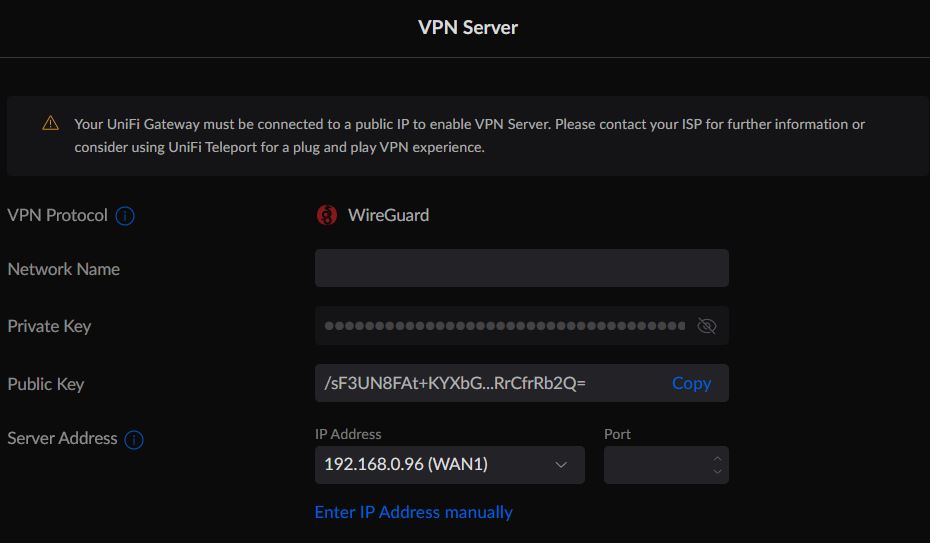
The VPN Server GUI Wizard shown below shows only the option to create a WireGuard instance. I am not completely sure why as I have a L2TP VPN server on the UDM SE already. Bugs – more bugs I guess.
The point of interest in the screenshot is the warning. “Your Unifi Gateway must be connected to a public IP to enable the VPN Server.”….etc, etc…
As noted in the Server Address field, that address is not the Public WAN IP. In fact, my UDM SE sits behind the ISP modem, and the ISP modem hands out the IP Address shown to the WAN port of the UDM SE. The only way to remedy this “problem” would be to bridge the UDM SE WAN port to external ISP Modem interface so that the ISP would issue the IP Address directly to the UDM SE. While its possible to do this, some ISP modems dont allow for it. In other cases, some would rather have the extra NAT layer as a measure of security. What ever the case may be, this WireGuard Wizard is certainly lacking in flexibility to the point of not being useful at all.
Reading on through the warning, the recommendation is to use Unifi Teleport VPN. I have used it, and yet another limitation is that Teleport is an App that is cell phone only! Not available for Windows and certainly no Linux option, probably not ever. Cell Phone only Teleport Access seems gimmicky to me. Not useful in the scope of full access by a real computer with a real screen, doing real work. I digress. These new VPN use case options were not well thought through. Perhaps fine for today’s Cell Phone Generation who probably doesnt know how to use a desktop or laptop computer. Phone apps are mostly pointless and I look at them as a one-use-tool-in-a-pinch model. Move along, nothing to see here, yet…..
WireGuard – The UnfiOS Workaround
When the word “workaround” is mentioned in writing, the mind-image is usually to tweak something that already exists to fit the need of the immediate use case, vendor supported or not. As stated above, the new Wireguard implementation in UnifiOS exists, and no matter of tweaking will make it useful for my needs. This then requires, if WireGuard VPN is the end goal, a separate solution, not running on the UDM SE.
WireGuard – PiVPN not running on a Raspberry Pi SBC
There is no lack of WireGuard tutorials on the internet. I have followed some of them that just dont work at all, and what I have found is that theses tutorials are installation teaching. Not much understanding can be gleaned from them when nothing works properly and there is no foundation of reference in terms of troubleshooting. For those that need a turnkey solution that works, use PiVPN.
This is not another tutorial, but a description of how I implemented PiVPN. The installation and use of PiVPN is so easy, “Even a Caveman Can Do It”! PiVPN will run on any Linux base without using a Raspberry Pi single board computer. PiVPN was originally intended to run on the PiOS, but it runs just fine on the more common Ubuntu Linux no matter the device. And it just works! No troubleshooting!
PiVPN – WireGuard Setup and Flow
For my use case, I am using Proxmox VE and created a low resource virtual machine with 512 megs of RAM, a single processor, small hard disk and a single network connection. I then installed Ubuntu Server version 22.04.01. I placed this VM onto the same network as the UDM SE. I could have created a separate VLAN, lock it down and all that sort of thing, but I wanted this to work out-of-the-box and possibly make those VLAN and firewall changes later on.
With the VM up and running, from the Linux terminal I installed PiVPN and set up the basics from the menu driven installer. Very simple indeed. Then I created the client accounts for the devices that I wanted to provide access to. Install done in 15 minutes.
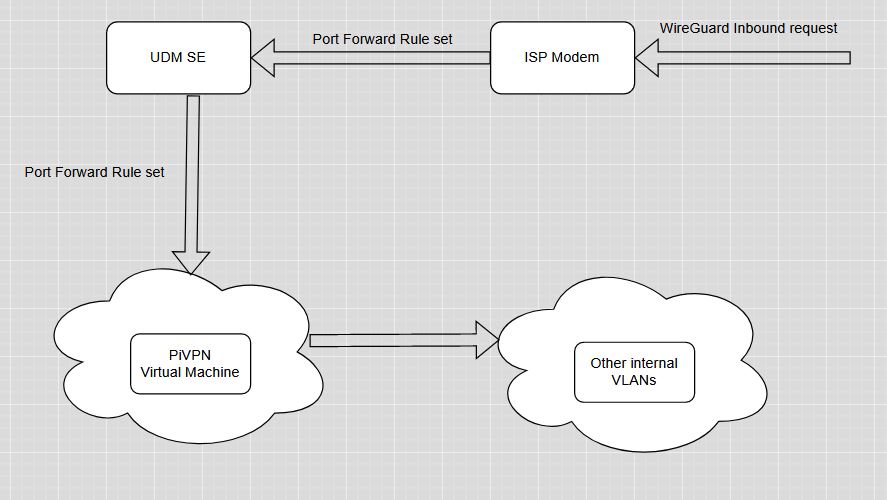
The network flow is the key piece of opening up this WireGuard server to external internet access. The whole reason we are doing this in the first place. To do that, port forward ports must be opened. There is an option during PiVPN setup to define the TCP port. I recommend to open any obscure port above port 1024. The reasoning for this is most internet port scanners (black and white scanning alike) usually scan the first 1024 ports where common standard ports exist for common TCP services like Port 80 for Web, port 443 for HTTS, port 22 for SSH and so one. I chose a port above the 4000 port count.
The TCP port defined, the port forward rule set up on the ISP router and the same rule set up on the UDM SE to point to the internal PiVPN host IP address, the test is ready. I installed the WireGuard client on the cell phone, a Windows computer and a Linux computer and configured the clients with the account information defined in PiVPN.
WireGuard Summary
I wanted to keep this article high level. There are more WireGuard resources on the web to read through, tutorials abound. This solution is simple but does leverage additional technologies of virtualization, Linux skills, networking skills, and even familiarity with Ubiquiti UDM hardware and software. I left out a glaring piece of the puzzle, and that is a WAN IP address or Domain name to point the WireGuard clients to in their configuration. IP address works well if the ISP modem IP does not change. Otherwise, use a DDNS service or buy a cheap domain name and use Cloudflare to manage it as I did. Yet more technology. But if you are reading my article this far, you already know about most of what I have spoken of.
The PiVPN solution is rock solid. I went to the grocery store but turned on the WG client on the cell phone before leaving the house. I used the Termux phone app (another one-use-tool) to ping an inside device continually. The WG connection stayed up the whole time I was in transit as was apparent from the ping trail. Very impressive.
Having a separate WireGuard solution running inside my network and not on the UDM SE is not all that big of a deal to me. I have other methods of accessing my network equipment, but using WG for computer connectivity, remote desktop (RDP) to my office computer was a solution I was looking for. It works well for that. Great encryption, peer networking, easy setup, peace of mind from prying eyes of the Internet.
The question in the back of every technology implementer’s mind is security. Can my network be hacked leaving the WG connection ports open to the Internet. There is always a measure of risk when opening any port. Just look at Banks and Mega Corps being hacked everyday. The potential is there. Keeping it low key, hidden where possible, turn it on when needed, turn it off when not needed is how I roll. I can simply turn off the PiVPN virtual machine when not using it. I can also pause the port forward rules on the UDM SE, or even the ISP modem to prevent any attacks when when I am not using the service. All of that can be accomplished remotely as well through other remote access means. If there is a will, there is a way!
Final Word
Ubiquiti has come a long way to implementing state of the art VPN technologies. They still have a long way to go to implement it in a way that can be flexible enough to meet the needs of the most demanding configuration, but that has to align with the UnifiOS strategy of 100% managing it through their GUI. Something that network administrators are not fond of. I expect WireGuard to become the standard offering along with OpenVPN on UnfiOS. Its just a matter of time. In the mean time, there is always a workaround, rather, stand alone solution that can be used while we wait.
