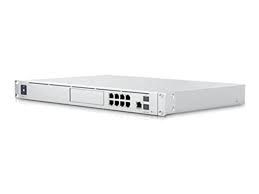
The Unfi Gear arrived on 13 October, just two days after order, shipped from San Antonio. I had ordered the Unifi Dream Machine Special Edition to include an 8TB hard drive for Unifi Protect. The switch I ordered, by no choice default due to no stock of any lesser 24 PoE switch, was the Layer 3 Pro switch. Fine. The new 24 port Pro PoE switch does have a 10G uplink instead of a 1 GIG, and that is an equivalent mate for the SE. My network does not even come close to using that bandwidth, nor does the internet connection warrant huge bandwidth, but hey, maybe a QNAP NAS is in order and I plug it into the UDM just to justify that bandwidth through the switch – but I digress. Long term, I dont care about a couple hundred bucks for a switch, but there are people out there that need a cheaper switch for larger scale projects.
The other extras ordered were a G4 Doorbell Camera and a pair of G3 Flex cameras. I did not want to spend a bunch of Google-Bucks on G4 Cameras @ $500 a piece just yet. No worries, however, they are not available in stock either.
Ubiquiti certainly delivers a Christmas Day experience. The gear was meticulously boxed, the units covered in a type of soft material to prevent scuffs and smudges. The bit and pieces to mount the units were boxed nicely and everything was installed into it own box tightly. Same goes for the cameras and doorbell. I have seen other companies deliver a great package experience. I think Apple started all this to be honest, but when you receive something that looks so nice delivered, it just had to be a top notch product, right?
I set up the gear, plugged into a port on the internet modem to keep it separated from the Cloud Key and USG running my current network. The setup was easy, efficient, and I added one access point. Looks great, however, things went sideways with”forgetting” and “adopting” old devices into the new network. I have had this problem before with Unif stuff. Yes, there is the so called “inform” redirect, but that was problematic since after the devices were “forgotten” all the IP info was gone to. TLDR – I ended up simply shutting off the old gear and recreating the same networks and SSIDs on the new gear to help with bringing up my 50 devices that were awaiting the new network. I will post some details in Part 3.
Overall I am extremely satisfied with fit, finish, performance, new interface, the added Unifi Protect, just a sweet ecosystem. This is not enterprise @ home, this is SOHO @ home with enterprise quality gear. Yes, it is known that Ubiquiti hides the enterprise bells and whistles behind the UI, but for top end home use, I really dont mind. Once its set up, it will be forgotten, consuming power in the network closet for another 8 years!
